

Although historic mapping is interesting and popular with residents, it’s not always been easy for GIS teams to justify the time and cost of integrating it into a corporate GIS. Fortunately, you can now easily integrate National Library of Scotland (NLS) historic maps into iShare v6, enabling your colleagues to better understand place, assess change, and explain decisions.
In this blog, we look at the benefits of using NLS historic maps as basemaps in iShare GIS and iShare Maps. We’ve also included a link to a step-by-step walkthrough of how to set it up.
The benefits of seeing change in context, not isolation
Using NLS maps in iShare v6 will give your planners and policy officers richer context and enable them to make more informed decision making.
Most planning and policy decisions are currently made using a mix of modern Ordnance Survey (OS) mapping, aerial photography and thematic layers. These show your colleagues where things are now.
Adding NLS maps as basemaps gives them insights into how they got there. By switching from modern to historic views in seconds, users can check if a proposal aligns with historic patterns of development and see how the area has changed over time. In the example above, using data from Monmouthshire, you can see a NLS map from 1900s. The OS Outdoors map below offers a contemporary view.
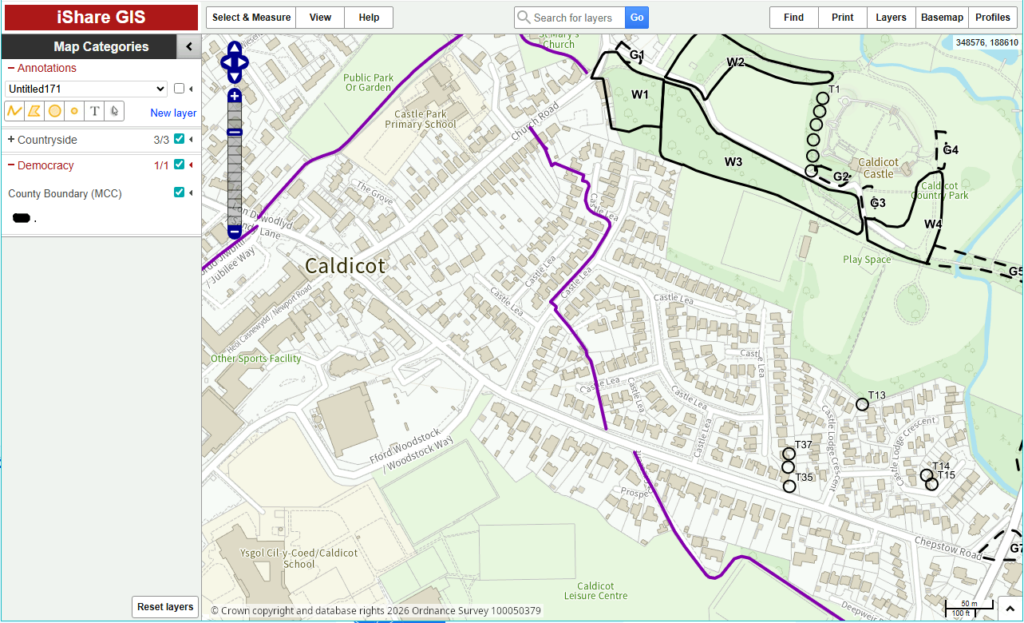
Amy Pritchard from Monmouthshire County Council elaborates:
Historic maps play a role in informing the decisions we take in the present. We have lots of staff in our authority who use historic maps regularly, we already provide access to some OS County Series and National Grid maps through iShareGIS. Adding the NLS maps to iShareGIS has given us higher‑quality versions of some maps as well as access to new historic maps.
We have 2412 Listed buildings within Monmouthshire. The decisions for many our listed building consent planning applications hinge upon whether an outbuilding was it in place prior to 1947, before then makes it legally curtilage listed.
More maps means more help. Our next step is to creating grid layers to sit alongside these new maps, allowing staff to link directly from the historic map in iShareGIS to the full PDF versions held by the NLS so they can view the complete map frame.
Telling clearer stories to residents and stakeholders
Residents and councillors may prefer to engage with “then and now” views than long reports or technical drawings. By making NLS mapping available in public-facing iShare maps, you can help them see that a proposed change is part of a longer story, not an isolated decision.
The user experience is stress-free. As the experience mirrors switching between OS and aerial basemaps, users can access historic maps without needing extra training or a separate viewer.
Reducing data management overhead and improving consistency
Traditionally, historic mapping has created a data management overhead. Streaming NLS mapping avoids most of this work. The implementation process is simple: MapProxy can be used to request the tiles from NLS, reproject them to British National Grid and provide a WMS and WMTS service compatible with iShare. To explore the technical steps in more detail, including example MapProxy configuration and iShare MapSource settings, please refer to our detailed guidance on our support pages.
The user experience
Any internal or public iShare map that includes the new basemap gives users a simple choice: modern OS, aerial imagery, or historic OS.
They can zoom in on a town centre, a coastline, or a rural area and immediately see how it has changed.
For regeneration projects, that might mean showing how a former industrial area has already gone through several phases of change. For coastal work, it might help illustrate historic erosion or land reclamation. For planning, it can highlight historic boundaries, routes or buildings that still influence the pattern of development today.
Next steps
If you are already using iShare v6 or above and have teams interested in historic mapping, this is a straightforward way to give them more context with minimal disruption.
We suggest identifying a small number of priority use cases, such as a conservation project, and piloting the new basemaps with relevant colleagues. Don’t forget, there’s a step-by-step guide to help you.
If you would like to discuss how this might work for your organisation, get in touch with your Account Manager.